KDL Grammar
KDL serves as a textual representation of KNIME workflows. The workflows consist of a variety of nodes with differing responsibilities, which connect with edges to form a graph. This domain language provides the capability to modify and author workflows to run within KNIME.
Nodes
Listed below demonstrates a simple node definition within KDL.
Nodes {
    (n1): {
        "name": "CSV Reader"
    },
    (n2): {
        "name": "Table to JSON"
    },
    (n3): {
        "name": "Column Reader"
    }
}
The individual node definitions reside within the Nodes { ... } section. Each node
identifies itself with a unique number prefixed with the letter ‘n’. The example above
consists of node definitions for n1, n2, and n3. The properties of each node are defined
to the right of the colon beside each node id. KDL uses JSON
for writing node properties. A functional node definition would consist of more properties,
but the example above illustrates the syntax required for defining nodes.
Explore the examples folder of the KDL repository to see fully defined nodes.
Workflow
A KDL workflow is defined by the connections between nodes in the following format,
where the node_id is a reference to the id of node definition within the Nodes {...}
section above
(<source_node_id>:<source_port>)-->(<dest_node_id>:<dest_port>)
All of the various connections are encapsulated within the "connections" section of
the Workflow {...} wrapper. For example the following denotes a simple workflow where the
output of node_1:port_1 is connected to the input of node_2:port_1, whose output is connected
to node_3:port_1
Workflow {
    "connections": {
        (n1:1)-->(n2:1),
        (n2:1)-->(n3:1)
    }
}
This example is the representation of the above KDL within the KNIME GUI.
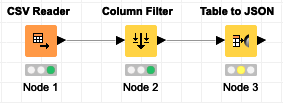
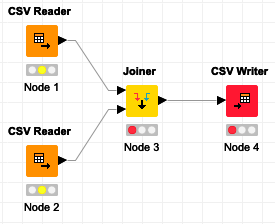
Nodes may have multiple inports and outports depending on the node’s definition but this is handled simply by updating the source/dest port in the connection definition. In the following example, node_3 is a Joiner node which has multiple inports
Workflow {
    "connections": {
        (n1:1)-->(n3:1),
        (n2:1)-->(n3:2),
        (n3:1)-->(n4:1)

    }
}
This example is the representation of the above KDL within the KNIME GUI.
Flow Variables
Flow variables are used in KNIME to parametrize workflows when node settings need to be determined dynamically. KDL supports usage and creation of both Global Flow variables as well as variables exposed from a node settings attribute.
Global Variables
Flow variables can be exposed at the workflow level, allowing those variables to referenced
within any node. This is accomplished within KDL by the addition of the "variables"
attribute within the Workflow {...} wrapper. The value of the "variables" attribute
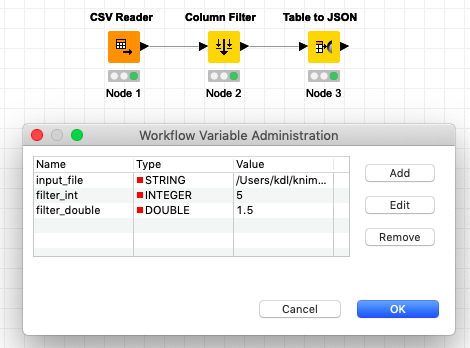
is simple a JSON list representation of the global flow variables:
Workflow {
    "variables": [
        {
            "input_file": "/Users/kdl/knime-workspace/Data/Demographics.csv"
        },
        {
            "filter_int": 5
        },
        {
            "filter_double": 1.5
        }
    ],
    "connections": {
        (n1:1)-->(n2:1),
        (n2:1)-->(n3:1)
    }
}
This example is the representation of the variables in the above KDL within the KNIME GUI
Variable Connections
Flow variables are carried along branches in a workflow via data links (black edges
between nodes) and also via explicit variable links (red edges between nodes). KDL provides
a user-friendly syntactic sugar for exposing these explicit variable connections within the
"connections" section of the workflow using a tilde-arrow ~~> in the connection
definition.
Workflow {
    "connections": {
        (n1:1)-->(n2:1),
        (n2:1)-->(n3:1),
        (n2)~~>(n3)
    }
}
This example is the representation of the variable connection in the above KDL within the KNIME GUI.
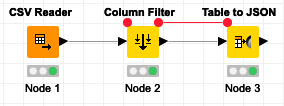
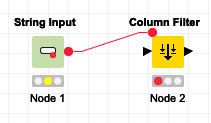
The port does not need to be specified for variable connections to/from the upper corner of nodes but there are some nodes (e.g. Quickforms String Input) which allow variable connections that require a port to be specified.
Workflow {
    "connections": {
        (n1:1)~~>(n2)
    }
}
This example is the representation of the variable connection in the above KDL within the KNIME GUI.
used_variable
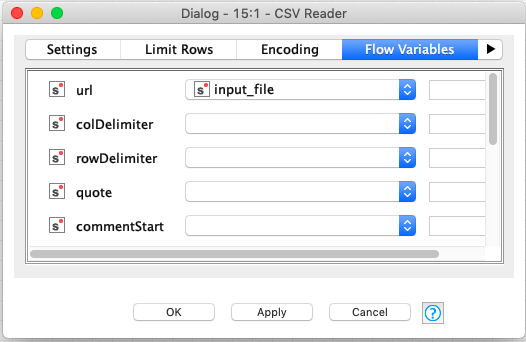
Flow variables are referenced within a node’s settings definition by adding the "used_variable"
attribute to the setting that is referencing the variable. In this case the CSV Reader node is
referencing the "input_file" global variable exposed in the example above. The value of the
"url" setting can be omitted as it will be dynamically populated by the variable.
Nodes {
    (n1): {
        "name": "CSV Reader",
        "model": [
         {
             "url": "",
             "used_variable": "input_file"
         }
    }
}
This example is the representation of referencing a variable in the above KDL within the KNIME GUI.
exposed_variable
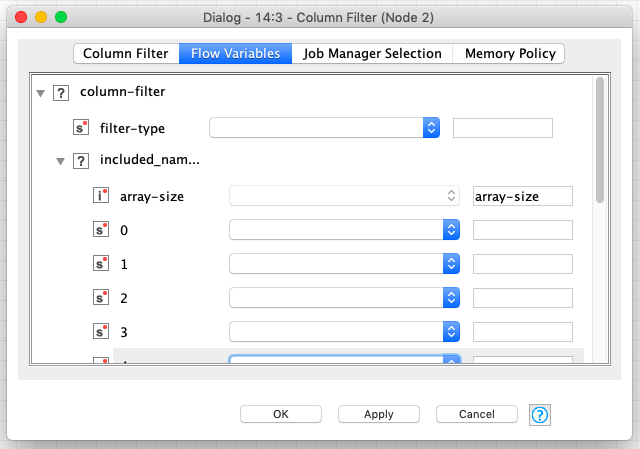
As mentioned earlier, flow variables can also defined within a node by exposing a node’s setting
attribute as a variable, using the "exposed_variable" attribute. In this case the Column Filter
node is exposing the value of the "array-size" setting as a flow variable that may be
referenced downstream in the workflow.
Nodes {
    (n1): {
        "name": "Column FIlter",
        "model": [
         {
             "column-filter": [
                 {
                     "filter-type": "STANDARD"
                 },
                 {
                     "included_names": [
                         {
                             "array-size": 11,
                             "exposed_variable": "array-size"
                         },
                         ...
                     ]
                 }
             ]
         }
    }
}
This example is the representation of exposing a variable in the above KDL within the KNIME GUI.
Meta Nodes
Within KNIME, meta nodes provide the capability to organize a workflow by creating subworkflows of groupings of nodes. KDL defines meta nodes in a similar syntax as regular nodes. Listed below illustrates the syntax for a meta node containing two children nodes.
Nodes {
    (n1): {
        "name": "Metanode",
        "type": "MetaNode",
        "connections": {
            (META_IN:1)-->(n1:1),
            (n1:1)-->(n2:1),
            (n2:1)-->(META_OUT:1)
        },
        "meta_in_ports": [
            {
                "1": "org.knime.core.node.BufferedDataTable"
            }
        ],
        "meta_out_ports": [
            {
                "1": "org.knime.core.node.BufferedDataTable"
            }
        ]
    },
    (n1.1): {
       "name": "Row Filter"
    },
    (n1.2): {
       "name": "Row Filter"
    }
}
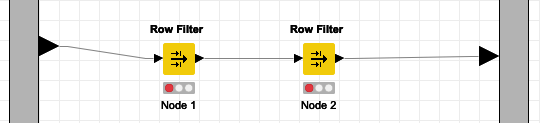
Within the example above, the n1 node serves as the meta node and the n1.1 and n1.2 nodes serve as the child nodes of the meta node.
The image below shows a meta node within the KNIME GUI.

The image below shows inside a meta node within the KNIME GUI.
Meta Node Attributes
The n1 meta node has five important attributes, which consists of name, type, connections, meta_in_ports, and meta_out_ports. The name attribute serves as a unique name for defining the meta node at hand. The type attribute signifies that this node is a meta node. The connections object defines the relationships incoming to the meta node via the META_IN relationship, the internal relationships within the meta node, and the outgoing relationships via the META_OUT relationship. The meta_in_ports and meta_out_ports define arrays of the types of incoming and outgoing connections to the meta node. The objects within these arrays define the port number as the key of the object and the value as the associated type. In the example above, port 1 has a type of BufferedDataTable.
Child Nodes
The child nodes are defined similarly to regular nodes, but differ with regards to their node identifiers. The identifiers use dot notation to establish a parent child relationship. The root of the identifier signifies the parent and the identifier following the separating dot signifies the child. For example, n1.1 specifies a child node of the metanode n1 with an id of 1.
Wrapped Meta Nodes
In comparison to meta nodes, which simply contain subworkflows, wrapped meta nodes encapsulate complete functionality. This essentially means the wrapped meta node defines a workflow of nodes and does not let in or out flow variables by default. Listed below illustrates a syntactical example of constructing a wrapped meta node.
Nodes {
    (n1): {
        "name": "WrappedMetanode",
        "type": "SubNode",
        "connections": {
            (n1:1)-->(n2:1),
            (n2:1)-->(n3:1),
            (n3:1)-->(n4:1)
        },
        "meta_in_ports": [
            {
                "1": "org.knime.core.node.BufferedDataTable"
            }
        ],
        "meta_out_ports": [
            {
                "1": "org.knime.core.node.BufferedDataTable"
            }
        ]
    },
    (n1.1): {
       "name": "WrappedNode Input"
    },
    (n1.2): {
       "name": "Row Filter"
    },
    (n1.3): {
       "name": "Row Filter"
    },
    (n1.4): {
       "name": "WrappedNode Output"
    }
}
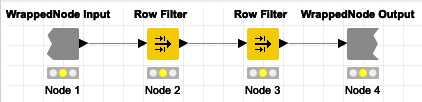
Similar to a meta node, a wrapped meta node constructs a parent-child relationship. The example above illustrates a wrapped meta node with four children. What differentiates a wrapped meta node from a meta node are the connections and the incoming as well as outgoing nodes. A wrapped meta node does not have META_IN or META_OUT connection, but rather has a WrappedNode Input and WrappedNode Output. Within the example, the WrappedNode Input is n1.1, which serves as the entry node of the wrapped meta node, and the WrappedNode Output is n1.4, which serves as the exit node of the wrapped meta node.
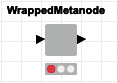
The image below shows a wrapped meta node within the KNIME GUI.
The image below shows inside a wrapped meta node within the KNIME GUI.
The example above only demonstrates syntax and does define a functional KNIME workflow. To explore a working example of a wrapped meta node, then review the W_Meta examples in the examples folder of the KDL repository.